Sourcegraph 3.3: Improving the user experience for site admins
We're excited to announce Sourcegraph 3.3. Sourcegraph is a code search and navigation tool (self-hosted, open source, and cross-repository.

We're excited to announce Sourcegraph 3.3. Sourcegraph is a code search and navigation tool (self-hosted, open source, and cross-repository.
We're excited to announce Sourcegraph 3.3. Sourcegraph is a code search and navigation tool (self-hosted, open source, and cross-repository). Read on for the details, and thanks to our customers and community for reporting issues and providing feedback. You're helping to make each Sourcegraph release the best one yet!
🛠️ Config-based repository selection Define add/exclude lists in external services instead of enabling/disabling.
🔌 Bitbucket Server integration Better PR code reviews on Bitbucket Server with hover tooltips and "go to definition".
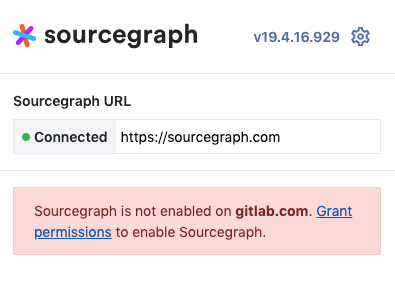
✔️Grant permissions on your code host When using code hosts other than GitHub.com.
🧭 "Go to definition" using dependency graph import / require statements are used to help find the right definition.
🦅 Swift code navigation Fly around Swift code on Sourcegraph.com or your code host.
🗄 Symbols for the current file The symbols sidebar is now scoped to the current file/directory you're viewing.
{/\*TODO(ryan): Show once 3.3 is available on DigitalOcean[**🚢 Deployments secure by default with TLS pre-configured**](#deployments)<br />AWS and DigitalOcean deployments with TLS via self-signed certs.\*/}
🔎 Handle common search queries containing (unintended) invalid regexp Searching for function call sites such as open( now work as expected.
📣 Tips for making Sourcegraph a part of your dev tools stack Documentation on integrating Sourcegraph and code search into your team's workflow.
🧯 Jump to Sentry issue from your code Your error and exception handling code, annotated with Sentry links.
📝 Changelog Every detail that changed in this release
🎖️ Thank you Sourcegraph couldn't be what it is without the community.
Deploy or upgrade: Local | AWS {/*<!--| [DigitalOcean](https://marketplace.digitalocean.com/apps/sourcegraph?action=deploy&refcode=48dfb3ccb51c)-->*/}| Kubernetes cluster
Insiders: Want to try pre-release development builds? Change the Docker image tag to sourcegraph:insiders.
Prior to 3.3, integrating with a code host and selecting which repositories to use was a manual process:

While it was simple, it presented some problems: Sourcegraph would fetch and list all repositories accessible to the token which often included both an account's private repositories, as well as the repositories from associated GitHub organizations.
Once dealing with more than a few dozen repositories (most of our customers have many thousands), manually enabling each repository was time-consuming, and often resulted in scripted GraphQL queries with selection logic.
From 3.3 onwards, selecting which repositories to search and mirror from GitHub, GitLab or Bitbucket Server is now part of the external service configuration for each code host.
This configuration exclusively determines which repositories are used, eliminating the manual process of enabling, disabling and deleting individual repositories.
Additionally, if a repository is deleted from the code host or if it is no longer accessible to the provided token, it will be deleted from Sourcegraph automatically. Renames of upstream repositories are also gracefully detected and handled.

For example, here are the fields for repository selection for the GitHub external service.
FieldDescriptionreposList of repositories to add "owner/name" format (view in schema)repositoryQueryList of strings that are queries by type, e.g. affiliated and/or code host specific search filters (view in schema)exclude*List of repositories to exclude in "owner/name" format (view in schema)
*exclude takes precedence over the repos and repositoryQuery syntax.
The GitLab and Bitbucket Server fields for repository selection are similar to GitHub, but differ based on the search and selection options in the code host's API.
This has been implemented for GitHub, GitLab and Bitbucket Server with additional code hosts being migrated to this model in 3.4.
Get IDE-like features on your next pull request review inline on Bitbucket Server by installing the Sourcegraph browser extension, then granting permissions for your Bitbucket Server domain.
Granting permissions in the Sourcegraph browser extension is necessary when using anything except GitHub.com. It's now easier to discover:
Definitions are now filtered using import / require statements to reduce false matches and improve accuracy.

See it in action on Sourcegraph.com or use it on your own instance for yourself or for all users:
The symbols sidebar is now scoped to the current file/directory you're viewing.

{/*TODO(ryan): Show once 3.3 is available on DigitalOcean ## Deployments secure by default with TLS pre-configured<p style="text-align: center"><img src="/blog/tls.png" style="width: 350px" /></p>The 3.2 release brought with it two new ways of deploying Sourcegraph to the cloud:- [One-click installer on the DigitalOcean marketplace](https://marketplace.digitalocean.com/apps/sourcegraph?action=deploy&refcode=48dfb3ccb51c)- [AWS EC2 Terraform plan](https://github.com/sourcegraph/deploy-sourcegraph-aws)They have been updated for 3.3 and now come pre-configured to use TLS with a self-signed certificate. Additional documentation now exists for getting the [self-signed certificate trusted by your browser](https://docs.sourcegraph.com/admin/ssl_https_self_signed_cert_nginx#5-getting-the-self-signed-certificate-to-be-trusted-valid-on-external-instances)Terraform plans for Google Cloud and Azure are being scheduled for upcoming releases. Let us know via [tweet](https://twitter.com/sourcegraph) or [GitHub issue](https://github.com/sourcegraph/sourcegraph/issues/new?assignees=&labels=&template=feature_request.md&title=) which cloud provider you want support for next, along with any special instructions for that provider.*/}
Using regexps in search queries is powerful, but sometimes you forget and just want to find matches for open(. Previously, this was treated as a regexp error, but now Sourcegraph does The Right Thing™ and looks for the literal match when there is no ambiguity.
Once a Sourcegraph instance is configured and ready for sharing, a site admin usually thinks:
To help make it easier for a site admin to introduce Sourcegraph into their development tools stack, we've created the following three resources:
1. How to run a Sourcegraph trial Give Sourcegraph the best chance of gaining traction by using our step-by-step guide for running a trial with your development team.
2. How to compare your existing code search tool to Sourcegraph If a code search tool already exists such as Hound or OpenGrok, our code search comparison guide highlights the strengths and weaknesses of your current code search tool in comparison with Sourcegraph
3. See how our customers use Sourcegraph See examples of how developers at companies such as Uber, Lyft, and Yelp depend on Sourcegraph every day.
Sentry is an open source error tracking tool which captures and sends error and exception notifications instantly. When browsing code on Sourcegraph or your code host, wouldn't it be great if you could jump straight to the Sentry records page whenever you see error handling code instead of manually navigating around Sentry?
The new Sentry Sourcegraph extension does just that and runs anywhere that Sourcegraph does, such as code views on GitHub/GitLab with the Sourcegraph browser extension.
The initial version of the extension provides support for the most popular languages:
Additional languages will be added as part of each new release and if you want a particular language added, create an issue for the sourcegraph-sentry repository.
foo( as foo\( and bar[ as bar\[ rather than failing with an error message.notices allows showing custom informational messages on the homepage and at the top of each page. The motd property is deprecated and its value is automatically migrated to the new notices property.gitlab.exclude setting in GitLab external service config allows you to exclude specific repositories matched by gitlab.projectQuery and gitlab.projects (so that they won't be synced). Upon upgrading, previously "disabled" repositories will be automatically migrated to this exclusion list.gitlab.projects setting in GitLab external service config allows you to select specific repositories to be synced.bitbucketserver.exclude setting in Bitbucket Server external service config allows you to exclude specific repositories matched by bitbucketserver.repositoryQuery and bitbucketserver.repos (so that they won't be synced). Upon upgrading, previously "disabled" repositories will be automatically migrated to this exclusion list.bitbucketserver.repos setting in Bitbucket Server external service config allows you to select specific repositories to be synced.bitbucketserver.repositoryQuery setting in Bitbucket Server external service configuration allows you to use Bitbucket API repository search queries to select repos to be synced. Existing configurations will be migrated to have it set to ["?visibility=public", "?visibility=private"] which is equivalent to the previous implicit behavior that this setting supersedes.lang: instead of file: filters for language/file-extension filter suggestions.github.repositoryQuery of a GitHub external service configuration has been changed to ["none"]. Existing configurations that had this field unset will be migrated to have the previous default explicitly set (["affiliated", "public"]).gitlab.projectQuery of a GitLab external service configuration has been changed to ["none"]. Existing configurations that had this field unset will be migrated to have the previous default explicitly set (["?membership=true"]).maxReposToSearch is now unlimited (was 500).github.repositoryQuery of a GitHub external service configuration has been changed to ["none"] and is now a required field. Existing configurations that had this field unset will be migrated to have the previous default explicitly set (["affiliated", "public"]).gitlab.projectQuery of a GitLab external service configuration has been changed to ["none"] and is now a required field. Existing configurations that had this field unset will be migrated to have the previous default explicitly set (["?membership=true"]).bitbucketserver.username field of a Bitbucket Server external service configuration is now required. This field is necessary to authenticate with the Bitbucket Server API with either password or token.Cloning, Not Cloned, Needs Index tabs were very slow on instances with thousands of repositories.The changelog for this and previous releases is available on GitHub.
Thank you to the many people who contributed to Sourcegraph since the last release!

With Sourcegraph, the code understanding platform for enterprise.
Schedule a demo